VSCode Server Setup
Accessing the VS Code Server
Step 1: Locate Event Outputs
- Go to the Event Outputs section in the workshop portal.
- You will find the following details:
- VSCODEURL: This is the URL to access the VS Code server.
- Password: This is the password required to log in to the server.
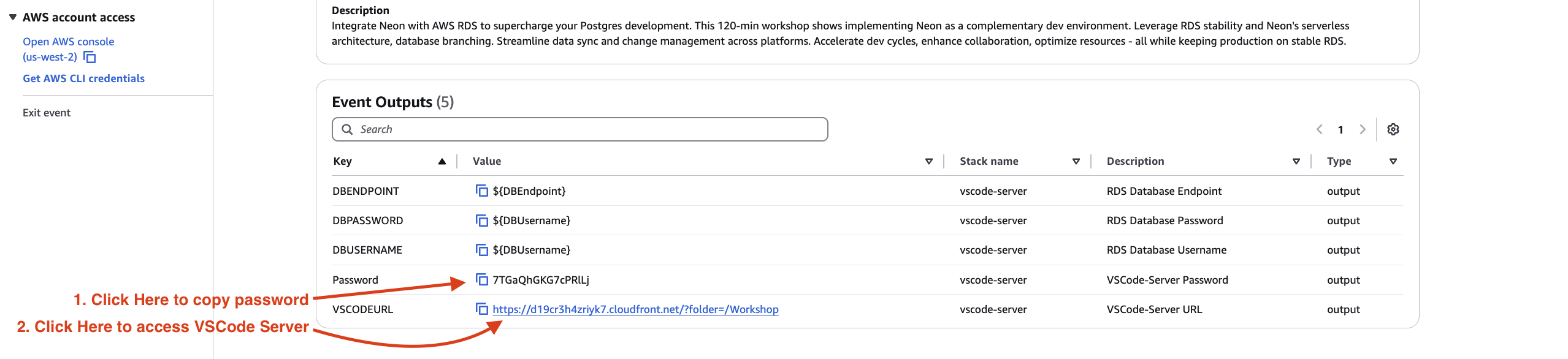
Step 2: Copy the Password
- Copy the Password value to your clipboard.
Step 3: Access the VS Code Server
- Click on the VSCODEURL link in the Event Outputs section.
- A browser window will open, prompting you to enter a password.

Step 4: Enter the Password
- Paste the password you copied earlier into the password field.
- Click Login to proceed.
Step 5: Start Coding!
- You now have access to the VS Code server, which is securely fronted by CloudFront.

Note: Ensure you use the latest version of your browser for the best experience. If you encounter issues accessing the server, try clearing your browser cache or contacting the workshop support team.